
Keep your Mac awake for as long as you need
Turn on Guarana and your Mac won't go to sleep while a download finishes, a build runs or you step away from a call. Pick 15 minutes up to 4 hours, or keep it on until you turn it off.
FreeNo trial or licenceMac and Windows
Guarana is free for everyone who downloads PeakFlow. It is not one of the five paid tools, so it keeps working after the 30-day trial ends.
Guarana
Pick how long, then leave it
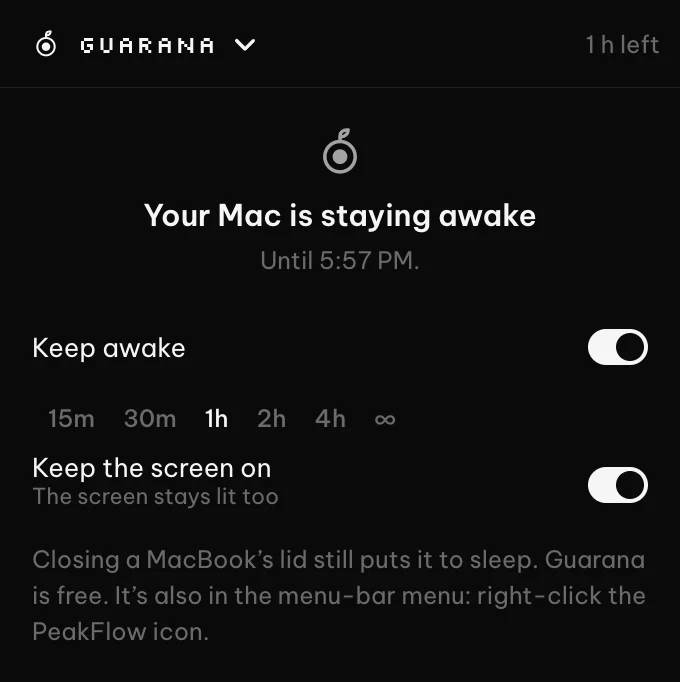
Click the PeakFlow icon in the menu bar and open Guarana. Switch on Keep awake and choose 15 or 30 minutes, 1, 2 or 4 hours, or ∞ for until you turn it off. The header shows the time left, and Guarana turns itself off when it runs out.
- Right-click the PeakFlow icon for the same switch and lengths
- Keep the screen on, or let it turn off while the computer keeps running
- Turns off when you quit PeakFlow, and starts off next time
Questions
You can email me at contact@getpeakflow.pro if you have another question.
Is Guarana free?
Yes. Guarana is free on Mac and Windows, with no trial and no licence. It is not one of the five paid tools, so it keeps working after the 30-day trial ends.
Does it keep a MacBook awake with the lid closed?
No. Closing the lid still puts a MacBook to sleep. Guarana stops the Mac sleeping while the lid is open and you are away from the keyboard.
What does Keep the screen on do?
When it is on, the screen stays lit, which suits a presentation or a dashboard. When it is off, the screen turns off on its usual timer but the Mac keeps running, so downloads, builds and music carry on.
How is it different from caffeinate?
It does the same job as the caffeinate command in Terminal, without the Terminal. You start it from the menu bar, pick a length, and see how long is left.
Get Guarana with PeakFlow
Download PeakFlow and Guarana is in the menu bar. The five paid tools come with a free 30-day trial, and Guarana stays free after it.