
AI dictation that types where your cursor is
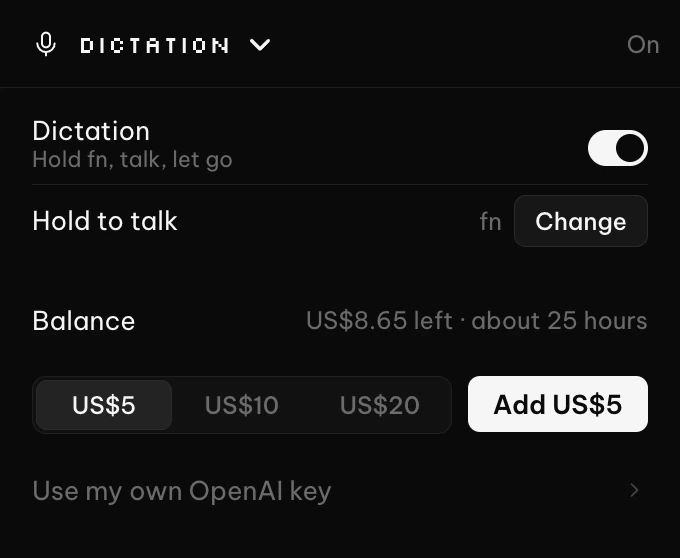
Hold a key, speak, and let go. OpenAI's gpt-transcribe turns what you said into text, and PeakFlow types it into the app you are using.
About a tenth of a cent per dictationCredit never expiresTop-ups from US$5
Hold a key, talk, let go
The words are typed where your cursor is, in any app. Dictation turns on once you add credit, and you can switch it off any time.
- Hold fn on a Mac or Right Ctrl on Windows, or pick any modifier or function key
- A clip can be up to 10 minutes long, and you can dictate up to 3 hours a day
- One licence works on 2 devices
Cleaner text, and your own words
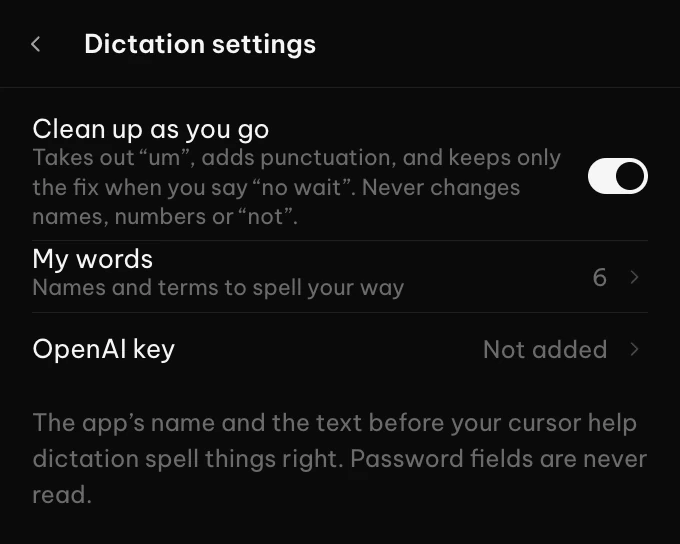
A light clean-up removes um and uh, adds punctuation and applies a clear correction such as "no wait". It does not rewrite what you said.
- If the clean-up drops a not, a number or a word from My words, your raw words are typed instead, unless you corrected yourself
- My words: list names and terms you use, one per line
- Write X -> Y to always replace one word with another
Priced at cost
OpenAI charges PeakFlow US$0.0045 a minute of audio for gpt-transcribe. You pay US$0.0057 a minute, billed by the second. The difference pays the card fee on your top-up and the server that passes each clip to OpenAI. There is no profit margin on top and no monthly plan.
| Dictations a workday | Words a day | PeakFlow a month |
|---|---|---|
| 50 | about 1,250 | US$1.23 |
| 100 | about 2,500 | US$2.45 |
| 200 | about 5,000 | US$4.91 |
Subscriptions cost the same however little you dictate: Superwhisper Pro is $7.08 to $8.49 a month, Aqua Voice Pro $10 to $12, and Wispr Flow Pro and Willow Voice Pro $12 to $15. A dictation here is a sentence or two, about 25 words: around 10 seconds of talking plus a second of holding the key. By our estimate that costs about a tenth of a cent with clean-up, or about 4.5 cents per 1,000 words. Subscription prices are from each company's pricing page on 25 October 2026, and the lower figure is the yearly plan. Those plans are unlimited, so they only cost less if you dictate more than about 290 times every workday (Superwhisper's yearly plan) or about 610 times (Wispr Flow's $15 plan).
How accurate is it? In Artificial Analysis's independent speech-to-text test, gpt-transcribe got 3.3% of words wrong, the lowest of OpenAI's models and lower than every Whisper Large v3 service tested. Wispr Flow does not say which speech model it uses, so it is not in that test.
Compare every AI dictation app →Prepaid top-ups
Buy a top-up inside the PeakFlow app. The whole amount becomes credit, and it is used by the second as you talk.
Credit never expires, and unused credit carries over. Tax, such as NZ GST, is added at checkout where it applies.
Questions
Anything else? Email contact@getpeakflow.pro and a real person will reply.
Is Dictation included in the free trial or in Pro?
How much does it cost?
Which AI model does it use?
How does it compare with Wispr Flow?
Can I use my own OpenAI key instead?
Where does my audio go?
What if a dictation does not go through?
Type with your voice.
Download PeakFlow free, then add credit when you need it.