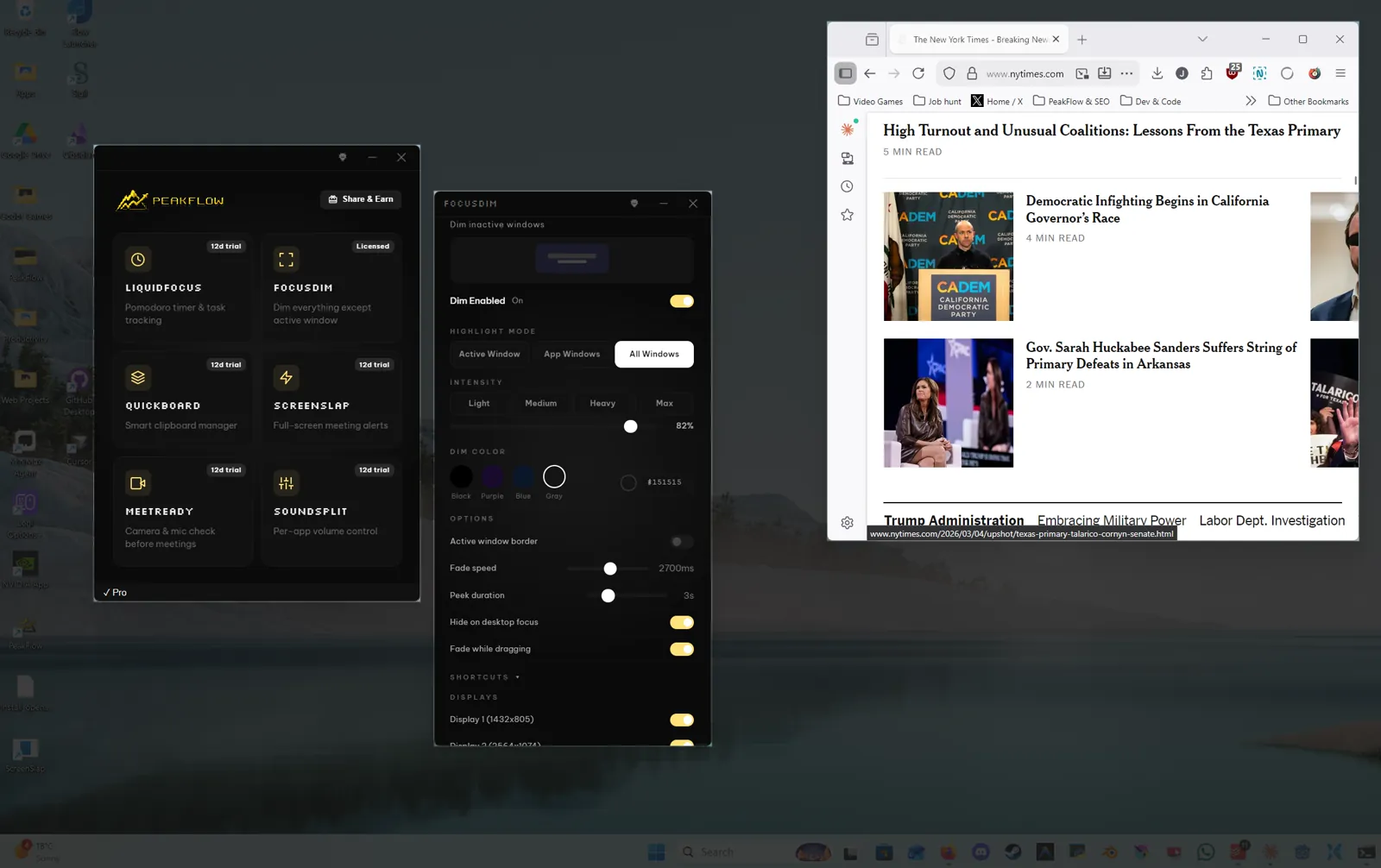
Why Dimming One Window Isn't Enough (2026)
Active mode leaves one window bright. App mode keeps the other windows of that app bright. Drag escape fades the dim while you drag a file.
ADHD Productivity on Windows: Focus Tools & Strategies
Chat and toasts cover the window you meant to finish. Dim the other windows, pause the work timer when your face leaves the camera, or put the meeting on the full screen.
50+ Windows 11 Keyboard Shortcuts (2026)
Keys Windows 11 actually has for snapping windows, clipboard history, and the three PeakFlow shortcuts that are real.
Clipboard Managers for Windows: 2026 Guide
Win+V keeps 25 clips and clears unpinned ones on restart. A clipboard manager keeps a longer list, with search, on the same PC.
Pomodoro Technique on Windows: Best Timers Guide
Run 25 minutes on one task, then a 5-minute break. LiquidFocus waits for you to start the break unless you turn that on. Windows 11 Clock has its own session timer.
Meeting Management on Windows: Never Miss Again
ScreenSlap covers the screen one minute before a Google Calendar event and stays for 60 seconds. MeetReady checks the camera and microphone.
Where each Mac app you used goes on this Windows PC
HazeOver, Paste, Hand Mirror, SoundSource, and the menu bar each map to a Windows control or a PeakFlow tool. The current installer is PeakFlow Setup 1.6.5, not 1.3.1.
Windows 11 Clipboard History (Win+V Guide)
Press Win+V and click Turn on. Windows keeps 25 clips, with no search, and a restart clears every unpinned clip.
Best Free Clipboard Managers for Windows (2026)
Win+V keeps 25 clips with no search. QuickBoard, Ditto, and CopyQ keep a longer list you can search, and a restart does not clear it.
Does the Pomodoro Technique Work? The Research
Cirillo's tomato timer is 25 minutes, then a 5-minute break. Linked papers report what they measured, with the sample limit kept beside each number.
Pomodoro Timer Windows: 5 Free Apps Compared (2026)
LiquidFocus can pause when your face leaves the frame. Pomotroid is only a countdown. The Windows 11 Clock app needs no install.
Best Productivity Apps for Windows 11 (2026 Guide)
What LiquidFocus, QuickBoard, FocusDim, PowerToys, and Everything do, and which job each one covers.
Google Calendar Notifications on Windows Desktop (2026)
Chrome can toast a Google Calendar event only while Chrome is open. ScreenSlap covers the screen one minute before the event, stays 60 seconds, and polls the calendar.
How to Dim Background Windows for Better Focus on Windows (2026)
FocusDim dims the windows behind the one in front. Press Ctrl+Shift+D. Active mode is the wrong mode when you need a second window.
Per-App Volume Control on Windows: Full Guide (2026)
Open Volume Mixer from the speaker icon or from Settings, System, Sound. SoundSplit gives each app a slider and can remember the level.
Focus Sessions in Windows 11: Complete Setup Guide
Open Clock, click Focus sessions, and start the countdown. Windows turns on Do Not Disturb. LiquidFocus is a separate timer, not this Clock tab.
Deep Work on Windows: Distraction-Free Setup Guide
Turn on Do not disturb, dim the other windows, and start a 25-minute timer. A Windows setup for staying with one hard task.
Full-Screen Meeting Alerts for Windows (2026)
ScreenSlap covers the Windows screen one minute before a Google Calendar event, stays for 60 seconds, and plays a sound. It polls the calendar, so a last-minute edit can wait.
How to Check Your Camera Before a Meeting on Windows (2026)
Open the Windows Camera app, test Zoom, Teams, or Meet, or press Ctrl+Shift+M. MeetReady checks the camera and microphone and can open two minutes before the event.
Mac apps beside the Windows controls that do the same job
HazeOver, Paste, Be Focused, Hand Mirror, In Your Face, and SoundSource beside the Windows control or PeakFlow tool that does that job.
How to Block Distracting Websites on Windows (2026 Guide)
Point a name at 127.0.0.1, use an extension, or change DNS. LiquidFocus only tells its browser extension what to block during a running timer.
How Clipboard Managers Boost Developer Productivity (2026)
Ctrl+C keeps one line. Win+V keeps 25 clips and clears unpinned ones on restart. QuickBoard keeps the earlier code clip for a later paste.
Ditto vs QuickBoard vs Windows Clipboard History
Ditto can share clips on the local network. Win+V keeps 25 clips and has no search. QuickBoard searches a list that stays on this PC.
How to Copy Multiple Items at Once on Windows (2026 Guide)
Ctrl+C keeps one clip. Win+V keeps 25. Paste an earlier row from that panel, or from a clipboard program with search.
Todoist + Pomodoro Setup: Task Time Blocking Guide
Click Connect Todoist in LiquidFocus, pick Today, Priority, a project, or a filter, then start a 25-minute block. The break does not start unless you turn that on.
Where Mac dimming, clipboard history, the menu bar, and per-app volume go on this PC
Win+V holds recent copies, the tray replaces the menu bar, and FocusDim dims the other windows. The current Windows installer is PeakFlow Setup 1.6.5.
Best System Tray Productivity Apps for Windows 11 (2026)
What SoundSplit, QuickBoard, FocusDim, EarTrumpet, PowerToys, and the other tray apps do when you click the icon.