Pricing Blog
Download for Windows Download for Mac

Changelog

Every PeakFlow release, newest first. Each entry is the release notes as we wrote them for the update.

PeakFlow 2.1.3

Dictation top-ups work

The US$5, US$10 and US$20 buttons on the Dictation page now open the checkout. In 2.1.2 they had no link behind them.

PeakFlow 2.1.2

Dictation starts sooner

PeakFlow now gets the dictation bar ready in the background, and starts recording the moment you press your dictation key, so the first words you say aren't lost. The microphone stays off between dictations.

The dictation bar is now just the pill, without the dark box around it.

Pick any key to hold

Dictation is no longer limited to fn (Mac) or Right Ctrl (Windows). In the Dictation tool, click Change next to Hold key and press the key you want: Command, Option, Control or Shift on either side, fn, or F1 to F20. Keys that type letters can't be used.

Dictation switches on after your first top-up

When you buy dictation time, PeakFlow turns dictation on for you. If you turn it off yourself, it stays off.

A US$5 top-up adds US$5

Your balance now goes up by the full top-up amount. Any sales tax, such as GST, is added on top at checkout. US$5 still covers about 15 hours of talking.

Fixes
  • Using your dictation key in a shortcut, such as ⌘C when ⌘ is your dictation key, no longer throws away words that are still being typed.
  • After you buy time, the Dictation page checks your balance again when you come back from the checkout, so the new time shows up without restarting PeakFlow.

PeakFlow 2.1.1

Dictation: hold a key, talk, let go

Dictation is now a tool of its own in the PeakFlow panel, next to SnapGrid and QuickBoard (⌥⌘6 on a Mac). Hold fn on a Mac (Right Ctrl on Windows), say what you want to write, and let go. PeakFlow types your words where your cursor is.

To pay for the talking, buy US$5, US$10 or US$20 of time. US$5 covers about 15 hours. Time you don’t use never runs out, and there is no subscription. If you have your own OpenAI key, you can use it instead.

If your internet drops while you talk, PeakFlow keeps the recording for 30 minutes. Click Try again and it types your words.

SnapGrid: move windows with a key

SnapGrid is a new tool. On a Mac, press Ctrl+Option and an arrow key to put the front window into the left or right half. Other keys fill a third or a corner of the screen. On Windows, use Ctrl+Alt and an arrow key. The SnapGrid panel shows every layout as a button and can arrange all your open windows at once. If you move a window by mistake, Put it back returns it to where it was.

On a Mac you can also drag a window to the edge of the screen to snap it. If macOS's own tiling is switched on, SnapGrid leaves dragging to macOS and only uses the keys.

SnapGrid comes with PeakFlow Pro and the all-tools licence at no extra cost.

A launcher on Option+Space

Press Option+Space on a Mac or Alt+Space on Windows to open the launcher. Type to find an app or file, do a sum, convert units or paste a saved snippet. Press Tab to ask AI the question you typed. If another app already uses Option+Space, PeakFlow picks a free shortcut and tells you which one.

AI on your own ChatGPT or Claude

QuickBoard's AI actions and the launcher use your own ChatGPT or Claude account. They run through the Codex or Claude Code app on your computer, so your text goes from your computer to OpenAI or Anthropic and not through PeakFlow. PeakFlow never sees your login. If neither app is installed, click Connect ChatGPT or Claude and PeakFlow sets one up.

Other changes
  • QuickBoard doesn't save passwords you copy from a password manager. Copying a link no longer opens that link in the background.
  • Cancelling or refunding Pro now ends access to the tools. If the licence check can't reach the internet, your tools keep working.
  • You can remove your licence from a computer, so you can move it to a new one.
  • Windows: PeakFlow no longer takes Ctrl+Alt with a letter or number, so AltGr keys such as € and @ type normally again.
  • Windows: PeakFlow downloads this update in the background and asks you to restart.
  • Mac: PeakFlow tells you about this update, shows the download's progress and downloads it from getpeakflow.pro. Drag the new PeakFlow into Applications and choose Replace. You can also skip a version.
  • Mac: if a tool stops working after you update, macOS has forgotten PeakFlow's Accessibility permission. PeakFlow shows the fix step by step, with pictures, and says All set when it works again. The same steps are at https://getpeakflow.pro/mac-permissions.
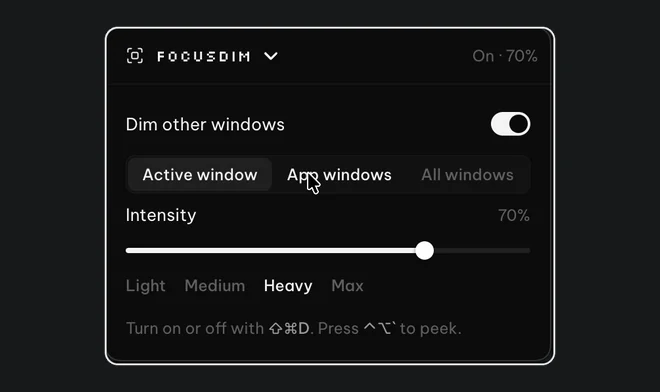
  • Mac: FocusDim now dims on every desktop and over full-screen apps.
  • Prices in the app are shown in US dollars.

PeakFlow 2.0.2

  • The update button now downloads the new version straight from getpeakflow.pro, opens it, and shows the steps to finish installing.
  • PeakFlow checks for updates every four hours while it runs.

Windows stays on v2.0.1; nothing changed there.

PeakFlow 2.0.1

Updates
  • PeakFlow now checks for updates while it runs, downloads them in the background, and asks once to restart. If you choose Later, the update installs the next time PeakFlow closes.
  • Updating from v1 no longer opens the installer wizard. It installs quietly and PeakFlow reopens.

PeakFlow 2.0.0

PeakFlow is now four tools in one panel: FocusDim, Liquid Focus, ScreenSlap and QuickBoard. Press Ctrl+Alt+1 to 4 to open each one.

What's new
  • One panel for all four tools, opened from the tray or with Ctrl+Alt+1 to 4.
  • A new look for every tool.
  • Every tool is free for 30 days. After that, PeakFlow Pro is $2.99 a month, or buy one tool for $9.99 or all four for $29.99.
  • If you bought PeakFlow v1, v2 is free for you.
Removed
  • SoundSplit and MeetReady are no longer included.

PeakFlow 1.6.5

Fixes
  • Licensing: product entitlements now update remotely (no app update needed when new products launch). All 9 store products correctly mapped — per-tool permanent licenses unlock their own tool, subscriptions and bundles unlock the suite.
  • Reliability: the app no longer quits itself after waking from sleep (watchdog false-positive fixed at the remaining edge cases).
  • SoundSplit: volume mixer no longer freezes if its audio bridge crashes; restarts are rate-limited; master volume 0% no longer displays as 100%.
  • QuickBoard: multi-step form fill and workflow pasting pasted the wrong field — fixed. Re-copying content after clearing the clipboard registers again. Paste-queue status restores correctly on open.
  • Calendar: simplified to iCal secret URL only (Google sign-in removed); all-day event timing bug eliminated.
  • Offline license activation no longer claims success if the key could not be stored.
UI
  • New consistent icon set (lucide) across all tools.
  • Fixed clipped timer chart (LiquidFocus), cramped headers (QuickBoard, SoundSplit), invisible gray dim-color swatch (FocusDim).
  • Dashboard status bar now distinguishes single-tool licenses from the Pro suite.

PeakFlow 1.6.4

QuickBoard clipboard fixes

  • Onboarding pinned templates now create real history entries
  • Transform and AI paste actions simulate Ctrl+V into the target app
  • Workflow and form-fill hotkeys route correctly (Ctrl+Shift+N / Q)
  • Sequential paste queue persists usage counts
  • Workflow edit upserts in place instead of delete/recreate
  • Queue status syncs when reopening QuickBoard
  • AI suggestion apply handlers wired for pin/tag/workflow
  • Paste paths avoid polluting clipboard history during multi-step flows

PeakFlow 1.6.3

  • LiquidFocus + FocusDim clipping fix — viewport pinned to real window size (no 100vh overflow), removed mobile viewport meta, useContentSize tool windows, responsive timer ring, FocusDim scroll region
  • Installer hygiene — exclude local artifacts/ from builds; hyphenated PeakFlow-Setup-{version}.exe artifact name

Carried from v1.6.2 (verified in tree)

  • Dashboard blank screen fix: lazy-load heavy tool bundles on open
  • Licensed users: license checked before install gate; syncLicensedToolInstalls on startup
  • Dashboard shows Licensed / Open for covered tools
  • Status bar: suite licenses show Pro, single-tool shows Licensed
  • Pro/subscription product IDs 863559 and 863806 unlock full suite

Carried from v1.6.1 (verified in tree)

  • Paid license unlock / fail-closed product map
  • Share & Earn mailto link
  • Trial decrypt recovery when safeStorage context changes
  • Watchdog ignores sleep/hibernate gaps
  • Auto-updater downloads PeakFlow-Setup-{version}.exe

Install

Download PeakFlow-Setup-1.6.3.exe below. Fully quit PeakFlow from the tray before installing.

PeakFlow 1.6.2

Fixes

  • Dashboard blank screen: lazy-load tool bundles so TensorFlow/QuickBoard no longer load on hub startup
  • Licensed users no longer stuck on Try Free storefront; covered tools auto-enable and show Licensed/Open
  • Pro vs single-tool status bar: suite licenses show Pro, single-tool licenses show Licensed
  • License check runs before install gate; Pro/subscription product IDs (863559, 863806) unlock full suite

Includes v1.6.1

  • Paid license Locked state fix, Share and Earn mailto, trial decrypt recovery, watchdog sleep false positives

PeakFlow 1.6.1

Bug Fixes

Licensing (paid users stuck on Locked)
  • Map Pro subscription product 863559 (and bundle 863806) to full-suite access
  • Valid active licenses with unmapped product IDs no longer get denied after activation
  • Offline grace: trust last successful activation when LemonSqueezy re-validation is unavailable
  • Dashboard badges refresh immediately after license activation
  • Trial-expired screen now re-opens the denied tool after a successful key entry
  • Status bar uses per-tool license state on tool windows
Other fixes
  • Share & Earn submit button opens the correct mailto compose flow
  • Watchdog no longer kills the app after sleep/hibernate false positives
  • SafeStorage trial date recovery when encrypted install dates cannot be decrypted

Install: download PeakFlow Setup 1.6.1.exe below. Existing users on v1.6.0 get this via auto-update.

PeakFlow 1.6.0

What's New

QuickBoard — AI-Powered Clipboard
  • AI Onboarding Wizard: Set up your role and preferences, and QuickBoard generates personalized workflows and form fill templates
  • Smart Transforms: Summarize, formalize, fix grammar, or custom-transform any clipboard text using AI
  • Workflows: Save multi-step paste sequences (dev setup commands, email templates, code snippets) and play them back with Ctrl+Shift+N
  • Form Fill: Store reusable form profiles and auto-fill fields with one click
  • Smart Suggestions: Context-aware clipboard suggestions based on what you copy
  • AI Triggers: Set up automatic actions when specific content patterns are copied
  • Transform Builder: Create custom AI transforms with live preview
  • Import/Export: Back up and share your clipboard history, workflows, and settings
  • Hotkey Settings: Customize all QuickBoard keyboard shortcuts
Bug Fixes
  • Fixed license key lookup for AI features (was reading from wrong store)
  • Fixed AI proxy model compatibility (migrated to @google/genai SDK)

--- Full Changelog: https://github.com/inchwormz/peakflow-electron/compare/v1.5.0...v1.6.0

PeakFlow 1.5.0

What's New

FocusDim
  • 3 highlight modes: Active Window, App Windows, or All Windows — choose what stays visible
  • Drag escape: dim automatically fades out while you're dragging a window, fades back in when you drop it
  • Compact settings panel: smaller preview, inline color picker, collapsible shortcuts section
  • Improved text readability: brighter text hierarchy across the settings panel
Auto-Updater
  • Direct download with taskbar progress bar (no more browser redirect)
LiquidFocus
  • Mini floating timer widget

--- Full Changelog: https://github.com/inchwormz/peakflow-electron/compare/v1.4.0...v1.5.0

PeakFlow 1.4.0

Unified design system and Todoist integration fix.

  • New unified visual design: yellow accent color, Silkscreen pixel font, updated logo across all tools
  • Fix Todoist integration for API v1 migration (task sync was broken)

PeakFlow 1.3.1

Bug fixes for fresh install trial, Dashboard layout, and FocusDim on multi-monitor setups.

  • Fix "Trial Expired" showing on fresh installs
  • Fix Dashboard buttons clipped on smaller windows (now resizable)
  • Fix FocusDim overlay not covering full vertical/portrait monitors
  • Fix FocusDim overlay lag when tracking active window

PeakFlow 1.3.0

What's New

Dashboard Storefront
  • Tools now appear as a catalog on the Dashboard
  • Click "Try Free — 14 days" to install a tool and start its individual trial
  • Only installed tools appear in the system tray menu
Per-Tool Licensing Fix
  • Fixed bug where all tools showed "Licensed" when user had a single-tool license key
  • Each tool now correctly shows its own status: Licensed, trial countdown, or Locked
Backwards Compatibility
  • Existing users: all tools auto-migrate as installed with original trial date
  • New users: start with an empty storefront, install tools one at a time

PeakFlow 1.2.0

Per-Tool Licensing
  • Individual tools can now be purchased separately ($9.99 one-time perpetual license)
  • Subscription ($5/mo) still unlocks all 6 tools
  • License keys are now validated per-product via LemonSqueezy product_id
  • Trial users still get full access to all tools for 14 days
Updated Trial Expired Screen
  • New "tool not included" screen for users whose license doesn't cover a specific tool
  • Shows both subscription and one-time purchase options
  • Lock icon differentiates from trial expiry (clock icon)

PeakFlow 1.1.0

Bug Fixes (20 total across all 7 tools)

LiquidFocus (9 fixes)

  • Timer tick drift, streak rollover at midnight, break counter reset
  • Task persistence ordering, active task tracking, focus detection cleanup
  • Stats sync on phase completion

QuickBoard (2 fixes)

  • Clipboard history insertion order preserved when trimming
  • Image capture now works when both text + image on clipboard

FocusDim (2 fixes)

  • Multi-monitor DPI overlay positioning corrected for secondary displays
  • Removed dead code (unreachable setFadeDuration)

SoundSplit (2 fixes)

  • Mute toggle no longer reads stale session state
  • Debug log capped at 1MB to prevent disk growth

ScreenSlap (2 fixes)

  • Eliminated double calendar fetch on startup
  • Alert history pruning no longer re-triggers ongoing meeting alerts

Google Calendar (2 fixes)

  • Concurrent OAuth window prevention
  • Token refresh no longer infinite-loops on persistent 401

Dashboard (1 fix)

  • Trial badge correctly hides for licensed users
Features
  • MeetReady: Disconnect calendar button + email display in settings