
Four Mac apps, one price
Most people come to the PeakFlow app for FocusDim, the window dimmer. The same download adds a clipboard manager, a full-screen meeting alert and a focus timer. Here's what the four Mac apps they stand in for cost on their own, next to $29.99 once for all four.
What the four apps cost separately
| Mac app | Job | Buy once | Yearly plan | PeakFlow tool |
|---|---|---|---|---|
| HazeOver | Dims background windows | $4.99 | None (buy once) | FocusDim |
| Paste | Clipboard history | $99.99 lifetime | $29.99 | QuickBoard |
| In Your Face | Full-screen meeting alerts | $69 (2 devices) | $24.99 | ScreenSlap |
| Be Focused Pro | Pomodoro timer | $39.99 lifetime | $19.99 | Liquid Focus |
| Four apps together | $213.97 | $79.96 first year, then $74.97 | ||
| PeakFlow app | All four jobs | $29.99 | Or Pro, $2.99 a month | All four |
The first-year figure on yearly plans includes HazeOver's one-off $4.99, because HazeOver has no subscription. Paste's lifetime price is from its Mac App Store listing; its own site lists Personal at $2.49 a month or $29.99 a year. Be Focused also has a free version with the timer, tasks and reports. Pro adds sync, app and website blocking and a few extras.
Price sources: HazeOver · Paste · Paste on the Mac App Store · In Your Face · Be Focused on the Mac App Store
Start with FocusDim
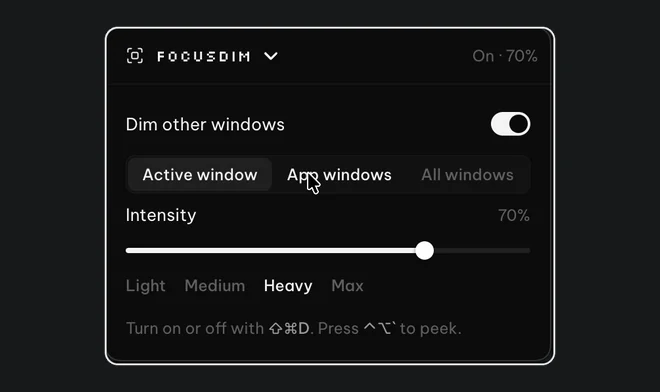
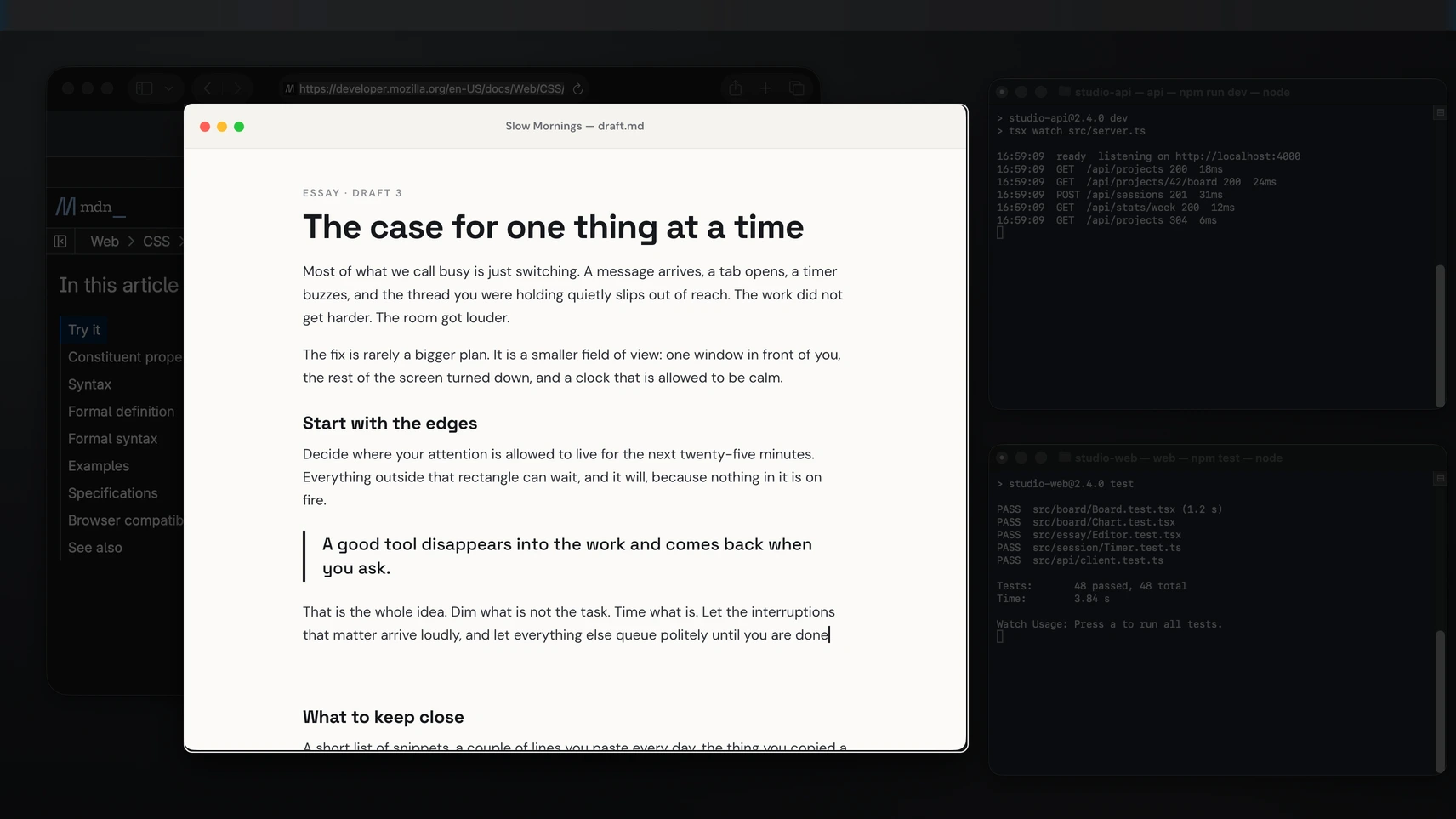
FocusDim is the tool most PeakFlow customers buy first. It dims every window except the one you're working in, so the browser tab and chat window behind your document fade back. You can keep a single window bright or every window from one app, pick the colour, and leave chosen apps undimmed.
Only want the dimmer?
FocusDim: $9.99 once
Dims every window except the one you're using, on Mac and Windows.
The other three tools
QuickBoard keeps what you copy: text, links, code, images and files. Press ⌘⇧V to search it, pin the clips you reuse, and paste a list of items in order with a paste queue. It keeps 500 clips by default and up to 2,000, and it skips copies from password managers. Compare it with Paste.
ScreenSlap covers your screen before a meeting starts, with a Join button for Zoom, Google Meet, Teams and ten other services. Connect any calendar that gives you an iCal link, including Google Calendar and Outlook. Compare it with In Your Face.
Liquid Focus is a Pomodoro timer with a task list, a streak and a floating mini timer. It can use your webcam, on your device only, to notice when you look away. Compare it with Be Focused.
What you give up
The four separate apps do some things PeakFlow doesn't. Paste and Be Focused sync to your iPhone and iPad, and PeakFlow has no phone app. In Your Face signs in to Google and Microsoft calendars directly, while ScreenSlap uses an iCal link. Be Focused Pro can block apps and websites. HazeOver works with Shortcuts and Focus filters. If one of those matters to you, that app is worth its price.
What you get with PeakFlow is one download, one menu bar icon, one licence that also covers Windows, and a 30-day trial of everything with no account or card.
Three ways to pay
| Plan | Price | What you get |
|---|---|---|
| One tool | $9.99 once | Keep one tool, such as FocusDim, for good |
| All four | $29.99 once | Keep FocusDim, QuickBoard, ScreenSlap and Liquid Focus for good |
| Pro | $2.99 a month | Every tool, for as long as you subscribe |
Questions
How much do HazeOver, Paste, In Your Face and Be Focused cost together?
Bought outright: HazeOver $4.99, Paste lifetime $99.99, In Your Face $69 and Be Focused Pro lifetime $39.99, a total of $213.97. On yearly plans it's $79.96 in the first year, including HazeOver's one-off price, then $74.97 a year.
What does the PeakFlow app cost?
All four tools cost $29.99 once. One tool, such as FocusDim, costs $9.99 once. Pro costs $2.99 a month. Every download starts a free 30-day trial of all four tools with no account or card.
Does PeakFlow work on Mac and Windows?
Yes. The PeakFlow app runs on macOS 13 or later, on Apple silicon and Intel Macs, and on Windows 10 and 11.
Can I buy only FocusDim?
Yes. FocusDim costs $9.99 once. You can add the other tools later or buy all four for $29.99.
Try all four free for 30 days
One download, four tools in your menu bar. Keep the ones you use.
⬇ Download the PeakFlow appmacOS 13 or later • Windows 10 and 11 • Free for 30 days, no account or card